The install button
How Chrome's PWA install icon can download a native Windows or macOS app installer - and why it beats a plain download page.
Editor's note: as of publication, direct downloads are live for both platforms - Abliteration-Setup.exe (Windows) and Abliteration.dmg.zip (macOS). The Windows Store listing is live too. The App Store submission is in Apple's review queue on Apple's timeline - direct DMG is the route until it clears.
Update, Oct 8, 2026: the Mac App Store listing is live. Both OS stores now ship the same binary as the direct installers, and copies installed from either store update themselves silently in the background.
There is one piece of real estate on a browser that no landing page ever wins: the icon at the right of the address bar that says install app. Chrome puts it there for any site that publishes a Progressive Web App manifest. It is, for a certain slice of visitors, the most trusted install button in existence - it is offered by the browser, not by the site.
Every serious desktop app has a Download page. Notion has one. Linear has one. Cursor has one. We have one too, at abliteration.org/app. And every serious desktop app also knows that once the reader is on that page, roughly nothing happens. People forget. They came to the site to browse the catalog, not to install software. The download page is not why they showed up.
Chrome's install-app icon is the opposite problem: it appears at exactly the moment the reader has decided the site is interesting enough to think about installing. But its default behaviour is to install a PWA - a stripped browser shell - not the real Windows or macOS app that would let you run models locally. The click was ambitious; the payoff is disappointing.
This piece is about the small trick that makes the click do the useful thing.
The trick, in one paragraph
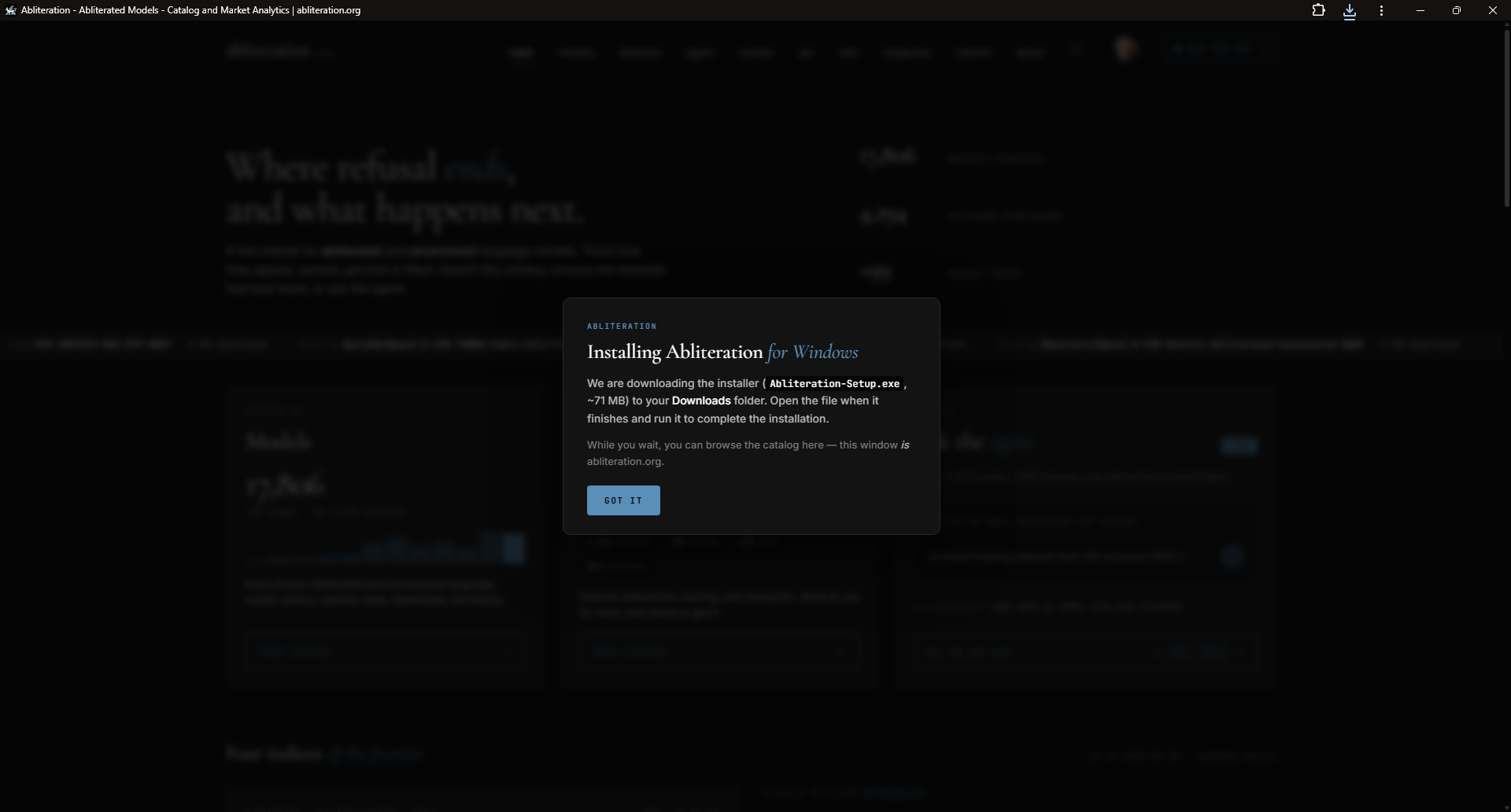
abliteration.org is a PWA. It ships a minimal manifest.webmanifest, a placeholder service worker, and three icons. When you click Chrome's install-app icon, Chrome installs the PWA and opens the site in a standalone window - no URL bar, our chimera in the title, taskbar icon on Windows, Dock icon on macOS. A second later, a tiny piece of JavaScript inside the standalone window checks window.matchMedia('(display-mode: standalone)').matches, notices that yes, we are in the PWA window and not an ordinary tab, reads the user's operating system out of the user agent, and clicks a hidden anchor with a download attribute pointing at Abliteration-Setup.exe (Windows) or Abliteration.dmg.zip (macOS). The browser starts the download. A dark modal appears on top of the site - the one at the top of this page - explaining what is happening and telling the reader to open the file when it finishes. localStorage records that the offer was made, so this never fires twice for the same person.
The site behind the modal is still the site. If the reader closes the modal without doing anything, they are looking at abliteration.org inside their standalone window, running as a live copy of the catalog. Everything works.
Why this earns its complexity
There is a common critique of tricks like this - that they are showy, that a plain download link would do. The critique is fair for most cases, and wrong for this one, for four reasons.
Attention. The install-app icon appears without the site asking for it. Chrome decides when to show it, based on engagement signals. A visitor who sees it has already stayed on the site long enough that the browser thinks a native install would be reasonable. That is a much better conversion signal than "clicked Download in the top nav." We are converting a moment of trust the reader already handed the browser, not one we have to earn from scratch on a landing page.
Trust. The install prompt is a Chrome-authored dialog, not a site-authored one. Users have been trained to be suspicious of "Download our app" popups because the ad industry ruined them. Chrome's install-app icon does not read like a marketing move. It reads like a browser feature. That is a five-year-old asymmetry we get to spend once, per visitor, and the reward for spending it is that the reader ends up with our real desktop app running locally on their machine.
Path. The reader clicks a browser button, sees a browser dialog, and thirty seconds later has a file in their Downloads folder that installs the app. There is no separate page to navigate to, no OS-detection heuristic to squint at, no "which build do I need?" dropdown to reason about. The PWA-installer branch on the user agent does the OS detection for us, silently, on the reader's own machine.
Compatibility with what we already are. We are the catalog of 17,000+ abliterated models. Readers come here from Google, from ChatGPT, from a link a colleague sent them. The install-app affordance sits on top of the catalog they were already reading. It doesn't require them to leave to start installing, and if they do close the modal, they are still on the site they came for.
The mechanics
Three files carry the whole thing.
1. public/manifest.webmanifest - the smallest possible PWA manifest. display: "standalone", start_url: "/", background_color: "#050505", and three icons (192 any, 512 any, 512 maskable). Chrome uses these to decide the icon appears in the address bar at all. The manifest never lies about what the PWA does - it says the site is browseable, which it is.
2. public/sw.js - a service worker that does nothing. No fetch handler, no caching, no offline shell. It exists solely because Chrome will not show the install-app icon without one, and we do not want to accidentally cache the catalog and start serving stale model counts. Every request goes through to the network, exactly as it would without the SW. Registering it costs us one line in the layout.
3. An inline script on the homepage that runs after load and does five checks, in this order:
- Is this a standalone PWA window, or an ordinary browser tab? (
matchMedia('(display-mode: standalone)').matches.) If it is an ordinary tab, do nothing. - Has the installer already been offered on this browser? (
localStorage['pwa_installer_offered'].) If yes, do nothing. - What operating system is this? Windows → the
.exe. macOS → the.dmg.zip. iOS, Android, Linux, or anything else → do nothing (a native installer would not run). - Click a hidden anchor with the right
downloadattribute, starting the browser download. - Show the dark modal over the top of the site with the file name, size, and a Got it button; write the "already offered" flag to
localStorageso the next standalone-window open does not repeat.
The whole thing is about forty lines of JavaScript. There is no build step, no framework, no runtime dependency. It is delivered inline on the homepage, so a browser that lands in the standalone window at any URL other than the root falls through and just sees the site.
Not a new pattern - but rarely used this way
Loopback endpoints between web and desktop, which we wrote about in The loopback bridge, have been a Spotify / Discord / 1Password staple for years. The PWA install-app icon has been a Chrome feature since 2019. What is unusual is combining the two: using the install-app affordance as a conversion trigger for a native app that has nothing to do with the PWA shell it just installed.
The one nearby example we know of is Chrome's own migration flow for legacy Chrome Apps, which used a similar trick to walk users off deprecated packaged apps and onto extensions or PWAs. That was Google using an install affordance to move users away from an install; we are using it in the opposite direction, to route them onto the real native app they came for.
Why not Ollama, LM Studio, or a plain download page
The default choices are worth naming.
Ollama distributes through curl | sh and a plain download button on the marketing site. Both have well-understood conversion characteristics - curl | sh filters for developers who trust piping shell scripts from a URL; the download button converts whoever was already reading the marketing page. Neither reaches a visitor who came to browse a model catalog.
LM Studio has a marketing site with an OS-detected download button. Same conversion shape as Ollama's plain button. The catalog lives inside the app, not on the marketing site, so there is no earlier moment of engagement to hook into.
A plain download page is what we ship at abliteration.org/app, and it does a fine job for readers who go looking for it. But most of our visitors did not come to install software. They came to browse the catalog. The install-app icon reaches them on the catalog itself, when they are already interested and Chrome has already noticed.
This is, plainly, the story of using a browser affordance the same way an app store does: as a promoted install slot the visitor is more likely to trust than an in-page button. We are just the app pointing at itself from the browser instead of from Apple's or Microsoft's shelf.
Where the sharp edges are
Three practical grabli we already ran into.
Cloudflare cache. HTML and icons are cached at Cloudflare's edge for four hours, and the caches on different edge nodes update independently. After a deploy, we needed a Purge Everything from the CF dashboard, otherwise some visitors saw an old icon or an old modal for the better part of a day. The fix - scripting a CF API purge into the site's deploy script - is on our list; until then it is a manual click, and worth remembering it exists.
Chrome's PWA state survives uninstall. If a developer or curious user installs the PWA, uninstalls it, and installs it again, the second install can serve a cached icon and can also carry the "already offered installer" localStorage flag from before, so the modal does not fire. For debugging, this is a one-line localStorage.removeItem('pwa_installer_offered') and a hard reload; it is not something ordinary users hit.
Windows tile icon padding. The Windows PWA icon renders visually smaller than the icon of the native app when both are pinned to the taskbar, because Windows applies its own internal padding on top of the PNG for tile-framework compatibility. The native app dodges this via MSIX-specific icon targets that a PWA cannot use. We accepted this as a platform limitation.
What the reader ends up with
One click on the install-app icon in the address bar, thirty seconds of ambient download, one opened .exe or .dmg, and the reader has the real Abliteration desktop app running locally - with the loopback bridge already lighting up the catalog they were browsing when they started. Two clever web-patterns most people miss, sitting on top of each other, each one making the other work better.
For a small independent project shipping desktop software into an ecosystem dominated by CLI installers and marketing landing pages, that is the shape of a good funnel: the browser makes the offer, the reader trusts the browser, and the real app is what shows up.
Where this leaves us
Both installers are live now - direct Abliteration-Setup.exe for Windows (also on the Microsoft Store) and direct Abliteration.dmg.zip for macOS. The App Store submission is with Apple, on Apple's timeline; the direct DMG is the route until it clears review. Third-party attribution for the runtime is at /licenses.
If you install through the address-bar icon, the modal above is what you will see. If you would rather click a normal button on a normal page, the app page is still there. Either way ends the same place: the real desktop app on your machine, opening the catalog that suggested it.
If you have questions we should be answering - a corner of the pattern we skipped, a comparable trick you have seen elsewhere, or a bug in either installer - write us.